






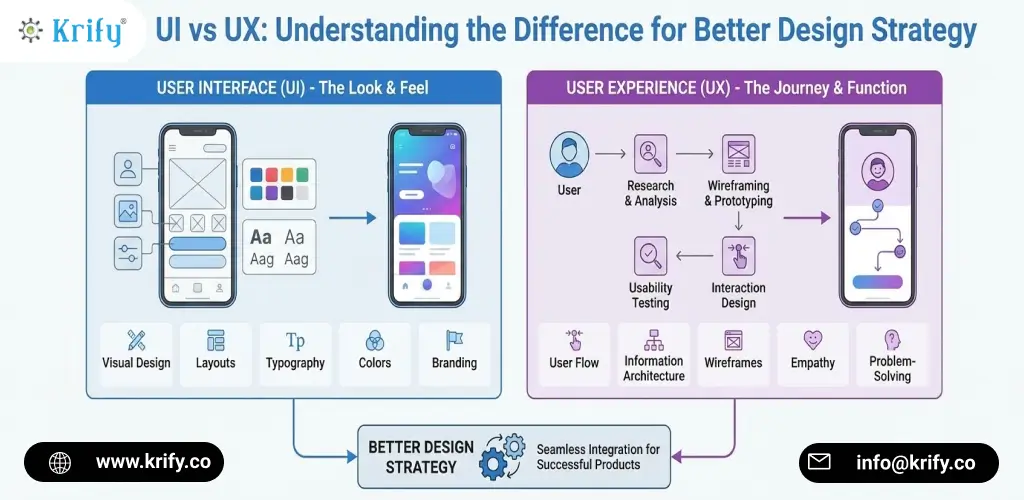
When people talk about design, the discussion usually starts with visuals. Colors, layouts, fonts, animations — those are easy to point out. However, real product success depends on more than appearance. That’s why understanding UI vs UX makes such a difference when teams plan a design strategy. At Krify, we’ve seen projects change direction simply because teams stopped treating UI and UX as the same thing. Moreover, once that distinction becomes clear, design decisions tend to feel more intentional and far less confusing.
Design isn’t only about what users see. Instead, it’s about how smoothly they move through a product and how confident they feel while doing so. Therefore, separating UI and UX helps teams design experiences that feel natural instead of forced.
UI vs UX: What They Actually Represent
UI, or User Interface, focuses on the visible layer of a product. It includes layout, colors, typography, spacing, buttons, and visual hierarchy. UX, or User Experience, looks at the full journey — how users discover features, complete tasks, and react emotionally to the process.
In simple terms, UI is what users look at, while UX is what they go through. Moreover, UI answers questions like “Does this look clear?” whereas UX answers “Does this make sense?” Both matter, but they solve very different problems.
Why Strong UI Alone Isn’t Enough
A product can look impressive and still feel frustrating. For example, an app may have beautiful screens but unclear navigation. As a result, users hesitate, make mistakes, or leave altogether.
That’s where UX design plays a critical role. UX focuses on behavior, expectations, and real-world use. Therefore, it ensures that design choices actually help users instead of slowing them down. In addition, strong UX often reduces drop-offs and support issues over time.
How UX Influences User Behavior
UX design is about flow and logic. It asks practical questions: Is the next step obvious? Does the user know what will happen when they click? Is feedback clear?
For instance, when forms are simple and responses are immediate, users feel more comfortable continuing. Moreover, when navigation feels predictable, people explore more confidently. Consequently, UX directly affects engagement and retention.
How UI Supports UX Decisions
While UX defines structure, UI brings clarity. Visual cues guide attention. Buttons feel clickable. Important actions stand out.
Therefore, UI reinforces UX decisions visually. In addition, thoughtful UI design makes interactions feel smoother. When UI and UX support each other, the product feels intuitive rather than overwhelming.
Common Confusion Around UI vs UX
One common mistake is focusing on visuals before understanding users. Teams may follow trends without testing usability. Another issue occurs when UX planning exists, but UI doesn’t clearly reflect it.
Moreover, treating UI and UX as separate silos weakens collaboration. Instead, aligning both creates consistency. Consequently, users experience clarity rather than friction.
Why UI vs UX Matters for Design Strategy
Design strategy connects user needs with business goals. Understanding UI vs UX helps teams decide where to focus effort and resources.
For example, improving UX may increase conversions, while refining UI may strengthen brand perception. Therefore, knowing the difference helps with smarter prioritization. At Krify, we’ve seen that products with a clear UI and UX strategy adapt better as features grow and expectations change.
The Real Impact of Getting UI and UX Right
When UI and UX are balanced, users don’t have to think too much. They simply use the product. On the other hand, when one is neglected, friction appears quickly.
Thus, understanding this balance isn’t optional — it’s essential for long-term success.
Conclusion
UI and UX aren’t interchangeable, but they work best together. When teams understand UI vs UX, they design with clarity, empathy, and purpose. If you’re planning a new product or refining an existing one, taking both seriously can make a measurable difference. If you’d like expert guidance on building a stronger design strategy, Contact us — we’d be happy to help.